

Dograh has a simple data model for passing information through a call. Understanding it is key to building agents that feel personalised and to extracting useful results after a call.Documentation Index
Fetch the complete documentation index at: https://docs.dograh.com/llms.txt
Use this file to discover all available pages before exploring further.
The three context objects
initial_context
Data available to the agent before the call starts — the contact’s name, account details, appointment information, anything the agent should know upfront. It can be set from several places:- API trigger — pass it in the request body when calling
POST /public/agent/{uuid}orPOST /telephony/initiate-call - Campaign CSV — columns beyond
phone_numberautomatically becomeinitial_contextfields for each contact’s call - Dashboard — set default template context variables on the agent, used when no external context is provided
Template variables
Values frominitial_context are available in your agent’s prompt using {{double_brace}} syntax.
Fallback values
If a variable might be missing or empty, use a pipe (|) to provide a default value:
customer_name is not set, the agent will say “Hello there” instead of leaving a blank. The syntax is:
Default variables
Built-in variables for current time and weekday, available in any prompt without setting upinitial_context.
| Variable | Description | Example output |
|---|---|---|
{{current_time}} | Current time in UTC (or inferred timezone) | 2026-04-02 14:30:45 UTC |
{{current_time_<TIMEZONE>}} | Current time in the specified timezone | 2026-04-02 20:00:45 IST |
{{current_weekday}} | Current weekday name in UTC (or inferred timezone) | Thursday |
{{current_weekday_<TIMEZONE>}} | Current weekday name in the specified timezone | Thursday |
<TIMEZONE> with an IANA timezone name such as Asia/Kolkata, America/New_York, or Europe/London.
When you use a timezone suffix on either
current_time or current_weekday, the other variable without a suffix will automatically use the same timezone instead of UTC. For example, if your prompt contains both {{current_time_Asia/Kolkata}} and {{current_weekday}}, the weekday will also be resolved in Asia/Kolkata.Telephony variables
For telephony calls (inbound and outbound), Dograh automatically adds these variables toinitial_context:
| Variable | Description | Example |
|---|---|---|
{{caller_number}} | The phone number that initiated the call | +14155550100 |
{{called_number}} | The phone number that received the call | +18005550199 |
caller_number is the customer’s number and called_number is your Dograh number. For outbound calls, it’s the reverse — caller_number is your Dograh number and called_number is the customer’s number.
gathered_context
Data the agent collects during the call. You configure what to extract in the agent node’s extraction settings — each variable has a name, type, and a prompt that tells the LLM what to look for.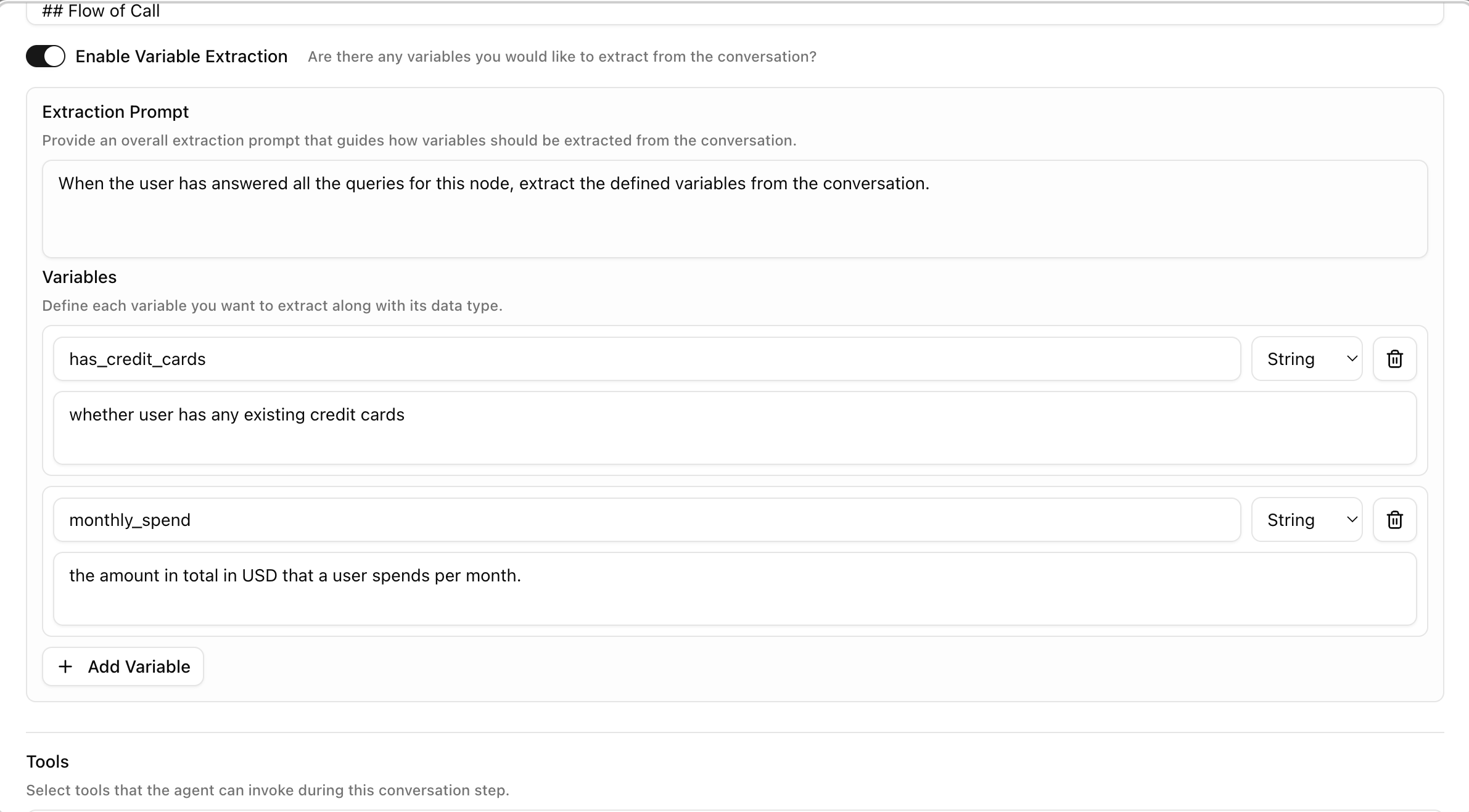
gathered_context is returned in the run record after the call completes and is available in webhook payloads for downstream processing.
Data flow example
Where variables are available
| Location | Variables available |
|---|---|
| Agent node prompts | initial_context fields via {{variable_name}} |
| Edge conditions | Evaluated against the live conversation — no explicit variable syntax needed |
| Webhook payload templates | All context objects via {{initial_context.field}}, {{gathered_context.field}} etc. |
| Campaign CSV columns | CSV columns beyond phone_number become initial_context fields automatically |